APIs
atlas.apis adds the API Entity Kind and plugin-owned Endpoint and Operation
data. It requires atlas.standard-catalog; Components can expose provided and
consumed APIs, while Flows can link Query and Event steps to imported data.
Enablement and configuration
Select atlas.apis alongside Standard Catalog in the distribution manifest,
then run the composition preflight and build described in Assembling a
distribution. The plugin has no
plugin-specific configuration. API specifications can be supplied inline or
from a URL; URL fetches and refreshes require the source to be reachable from
the running backend.
A specUrl is fetched only over HTTPS and only from a publicly routable
address. URLs with embedded credentials or a fragment are rejected, every
redirect is checked the same way, a response is capped at 20 MiB, and the
fetch times out after 10 seconds. An operator can exempt specific internal
hosts with ATLAS_APIS_SPEC_URL_ALLOWLIST; see Allow an internal spec_url
host.
Inline specification content is limited to 2 MiB.
Permissions and workflows
API entities use normal catalog authority. Endpoint and Operation reads use
atlas.apis.endpoint.read and atlas.apis.operation.read; their dependency
links have explicit read/create/delete permissions. Purging a removed Endpoint
or Operation requires the respective .purge permission and can be blocked by
service usages.
Create or open an API from the catalog, choose inline or URL specification content, then inspect the Specification and Operations views. OpenAPI imports Endpoints; AsyncAPI imports Operations. Link a service to the precise Endpoint or Operation when the relationship is more specific than a catalog relation.
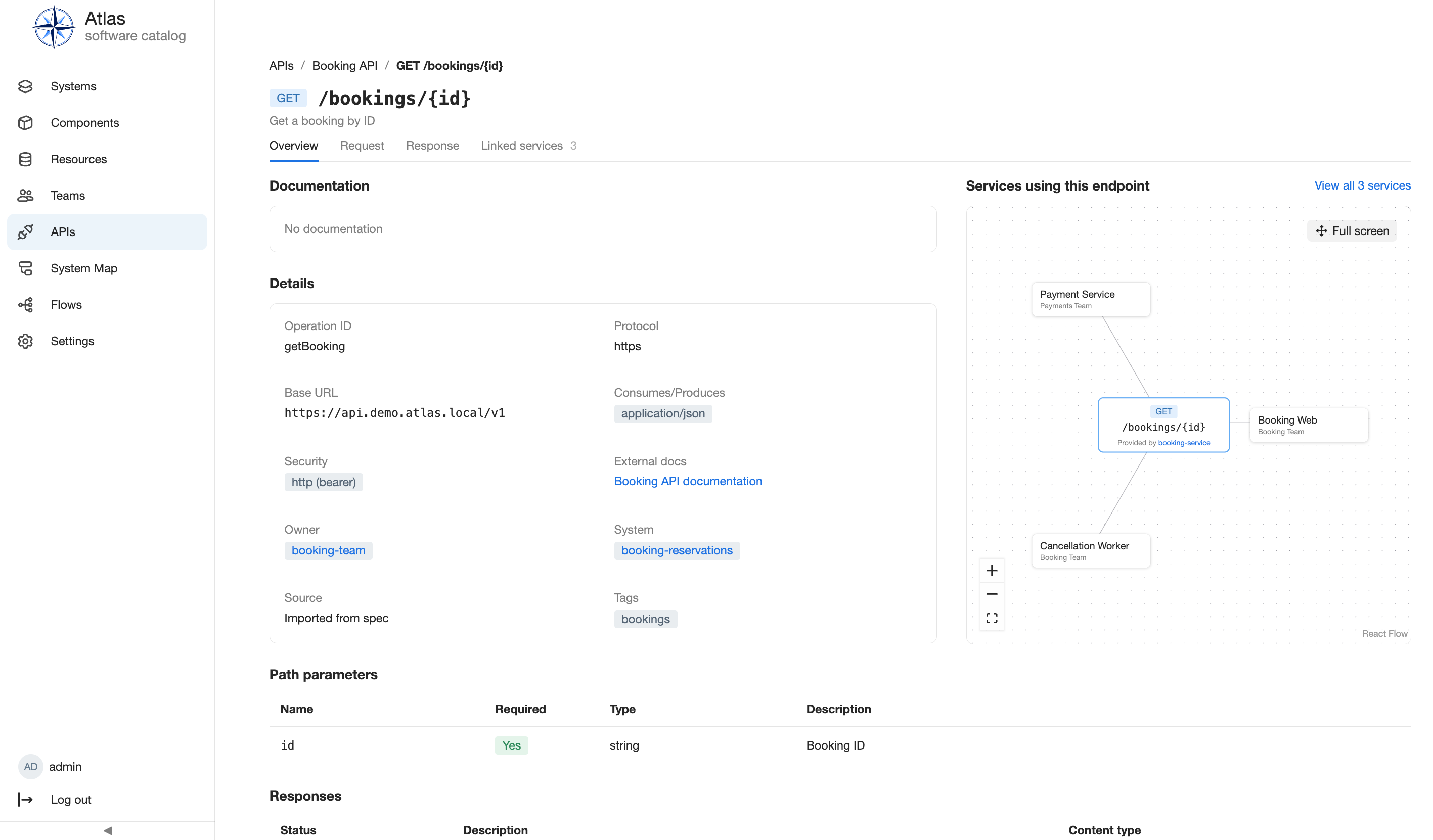
An Operation's linked-services graph names the exact services tied to that endpoint, distinct from the containing API's own catalog relations. For the catalog workflow, see Use feature-specific views.
AMQP events
An Operation's channel address is the name of the event, shared by every API
that mentions it, so the graph groups publishers and subscribers across
documents. For AMQP documents the address is the routing key in the operation's
bindings.amqp.cc (a list in AsyncAPI 3.x, a string in 2.x), trimmed; the
channel's own address is used when cc is missing or empty. The exchange, queue
and vhost from the channel's bindings.amqp are stored separately in the
Operation's delivery and play no part in grouping. Operations from other
protocols keep the channel address from the document. Only active Operations
appear in the graph; a removed Operation drops out until a re-import revives it.
Known limits:
- Wildcard keys such as
orders.event.#are kept as literal text and are not matched against concrete keys. - Two events that use the same key on different exchanges are merged.
- An event a document generator left out of its documents cannot be recovered by Atlas.
The graph never draws every linked service. The inline graph shows up to six services plus a +N more node that opens the full-screen view. Full screen draws up to 50 services as a left-to-right tree, one column per level, joined by rounded step lines, and can be dragged around. An Endpoint's graph has the endpoint on the left; an Operation's has the channel in the middle, with publishers on the left and subscribers on the right. Auto-layout resets all node positions. The Export button in the header saves the graph as SVG or PNG, with choices for a transparent background and the grid, as in the Flow and ER diagrams; the image shows the graph as currently framed. The search box finds services beyond the 50 drawn, highlighting matches; a final +N more node leads to the Linked Services tab for the rest. The Endpoints, Operations, and both Linked Services tabs share one pagination control with 15, 30, 50, or 100 rows per page.
Group services by team or system
The gear menu in the full-screen header has the grouping choice: No grouping, Group by: Team, or Group by: System. With a grouping on, each team or system that holds at least two linked services is one node showing its name, a color mark, and its exact number of services. A service without a team or system, and a team or system with only one service, stays an ordinary service node. An Operation groups publishers and subscribers separately, so a team can appear on both sides.
- A graph with 10 or more linked services opens grouped by Team until you choose otherwise; smaller graphs open ungrouped. Your choice, including No grouping, is remembered in your browser and overrides this default.
- Click a group to expand it in place and show its services; click it again to collapse it. Expanded services count toward the 50-service limit, and a group with more services than fit ends with its own +N more node that opens the Linked Services tab for that team (for a system, searched by its name) and closes the full-screen view.
- Searching never expands a group. Each group shows "N of M matches" and groups without a match are dimmed. Changing the search text or the grouping collapses all groups.
API, operations, and extension surface
The running generated HTTP API reference documents
the API, Endpoint, Operation, and service-dependency routes. Ingestion
periodically refreshes URL-sourced specifications through the plugin's
due_for_spec_refresh() surface. Plugin authors should use
declared contracts rather than importing models directly; see extension
points and capabilities.
Limits and troubleshooting
A failed refresh preserves the last successful specification and marks it
stale; a failed endpoint or operation import can likewise leave an older list.
Fix the URL or specification syntax, then retry the supported ingestion or
refresh path. A specUrl that stopped resolving after an upgrade usually points
at an HTTP or private address; serve it over HTTPS from a public host or add the
host to the allowlist above. Query/Event Flow steps are unavailable unless both APIs and
Flows are selected. Atlas does not promise support for arbitrary specification
formats beyond the implemented OpenAPI and AsyncAPI behavior.
Next steps
Use catalog workflows, distribution operations, the entity model, and the Plugin API reference.