Database Schema
atlas.database-schema adds the DatabaseSchema Facet to Resources. It
requires atlas.standard-catalog and attaches where the Resource's
schema.host.v1 capability is present; it owns no separate Entity Kind.
Enablement, configuration, and permissions
Select the plugin alongside Standard Catalog and run the distribution preflight. The plugin has no plugin-specific configuration, secrets, or registered permission. Schema writes reuse the owning Resource's catalog edit authority, so repository-managed Resources must be changed through their source and ingestion workflow.
Repository-managed schemas
When Ingestion is also selected, a Resource manifest can declare
spec.databaseSchema to keep this Facet in sync with a .sql file in the
repository instead of entering it by hand — see catalog-info.yaml: declaring
a Database Schema
source.
Once a Resource becomes YAML-managed, its Facet can no longer be created or
updated through the Schema tab or this plugin's API — the same read-only rule
every other kind of repository-managed data already follows. This applies
even if the current manifest doesn't declare spec.databaseSchema: if a
Resource with a manually-entered Facet is later adopted by ingestion, that
data is not deleted, but it becomes frozen — uneditable by hand — the moment
the Resource becomes YAML-managed, whether or not its manifest ever declares
spec.databaseSchema. Declare spec.databaseSchema in the manifest to manage
it going forward, or unregister the Resource's repository to restore manual
editing.
Workflows
Open a Resource, then use the Schema tab to set the dialect and SQL source. Use the ER Diagram tab to inspect the parsed result. Supported dialects are PostgreSQL, MySQL, and MS SQL.
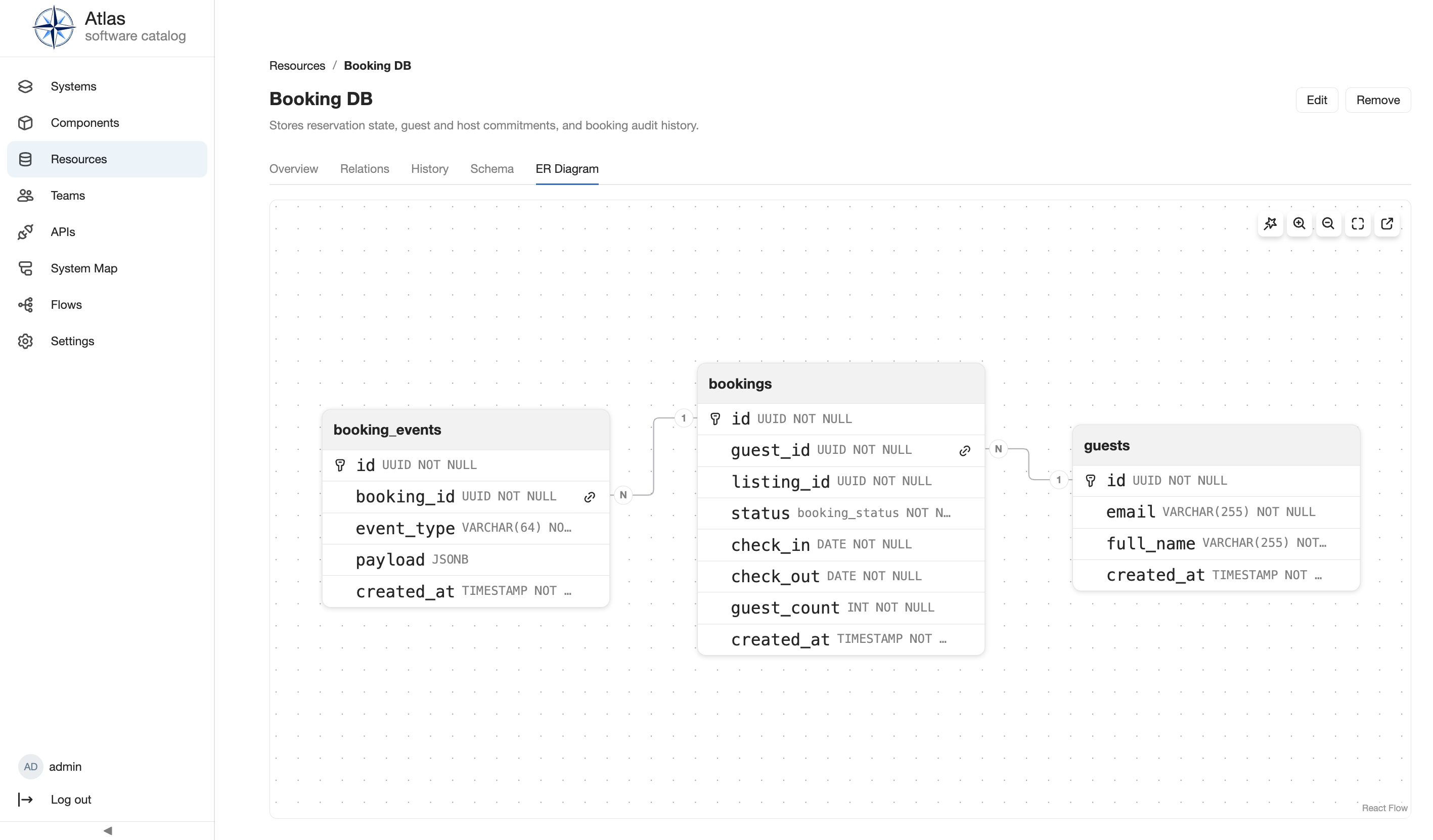
Saving parses synchronously: ok records structured schema data, while
failed preserves a parse-failed state for correction. Verify the result by
reloading the Resource and its ER diagram. For the workflow, see Use
feature-specific views.
API, operations, and extension surface
The facet uses a namespaced Resource-schema API instead of generic entity CRUD. Consult the running generated HTTP API reference for its routes. There are no jobs, secret settings, or standalone lifecycle actions. The facet and its frontend tabs demonstrate capability-targeted extension; authors should start with Entity kinds and facets.
Limits and troubleshooting
The diagram only reflects successfully parsed supported SQL. Correct dialect and SQL errors in the Schema editor; a permission failure means the reader lacks the Resource owner's edit authority. This plugin does not manage a live database, execute SQL, or infer a schema from a connection.
Next steps
Read catalog editing, Operating Atlas, permissions, the Plugin API reference, and the generated HTTP API reference.