Cli
Getting Started
Diagrams can be defined using the Python DSL or a JSON representation.
Python Example
Create a diagram using the Python DSL:
# diagram.py
from c4 import Person, Rel, System, SystemContextDiagram

with SystemContextDiagram() as diagram:
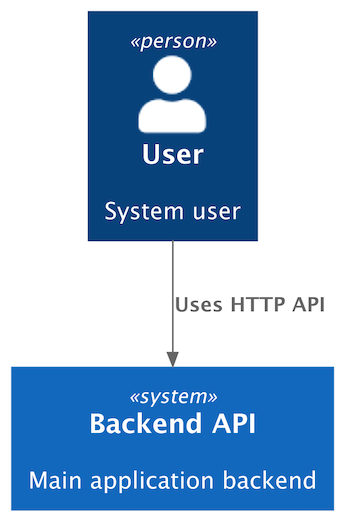
    user = Person("User", "System user")
    backend = System("Backend API", "Main application backend")

    user >> Rel("Uses HTTP API") >> backend
To render the diagram to text (by default, PlantUML source), run:
c4 render diagram.py > diagram.puml
Generated PlantUML source
@startuml
' convert it with additional command line argument -DRELATIVE_INCLUDE="relative/absolute" to use locally
!if %variable_exists("RELATIVE_INCLUDE")
    !include %get_variable_value("RELATIVE_INCLUDE")/C4_Context.puml
!else
    !include https://raw.githubusercontent.com/plantuml-stdlib/C4-PlantUML/master/C4_Context.puml
!endif

Person(user_a467, "User", "System user")

System(backend_api_8c20, "Backend API", "Main application backend")

Rel(user_a467, backend_api_8c20, "Uses HTTP API")

@enduml
To export the diagram to a rendered artifact (by default, PNG format), run:
c4 export diagram.py > diagram.png
This generates the diagram below:
JSON Support
Diagrams can also be defined in JSON format.
The same diagram expressed in JSON:
{
  "type": "SystemContextDiagram",
  "elements": [
    {
      "type": "Person",
      "alias": "user",
      "label": "User",
      "description": "System user"
    },
    {
      "type": "System",
      "alias": "app",
      "label": "Backend API",
      "description": "Main application backend"
    }
  ],
  "relationships": [
    {
      "type": "REL",
      "from": "user",
      "to": "app",
      "label": "Uses HTTP API"
    }
  ]
}
JSON diagrams are treated the same way as Python diagrams:
c4 render diagram.json— generate textual output (e.g. PlantUML)c4 export diagram.json— generate rendered artifacts (e.g. PNG)c4 convert diagram.json— convert to another representation (e.g. Python)
To convert a JSON diagram into the Python DSL, run:
c4 convert diagram.json --json-to-py > diagram.py
This generates:
# diagram.py
from c4 import (
    Person,
    Rel,
    System,
    SystemContextDiagram,
)

with SystemContextDiagram() as diagram:
    user = Person('User', 'System user', alias='user')
    app = System('Backend API', 'Main application backend', alias='app')
    user >> Rel('Uses HTTP API') >> app
Diagram Targets
The render and export commands accept a diagram target. For Python targets,
the optional name after : selects a specific diagram object in the file or
module. If no name is provided, the CLI auto-detects a diagram only when the target
has exactly one module-level
diagram.
The convert command currently supports JSON input targets for
JSON-to-Python conversion.
| Syntax | Meaning | Example |
|---|---|---|
file.py |
Auto-detect the single diagram in a Python file. | c4 render diagrams/context.py |
file.py:diagram |
Load a named diagram variable from a Python file. | c4 render diagrams/context.py:public_api |
module.path |
Import a Python module and auto-detect its single diagram. | c4 render architecture.context |
module.path:diagram |
Import a Python module and load a named diagram variable. | c4 render architecture.context:public_api |
file.json |
Load a JSON diagram. | c4 render diagrams/context.json |
Examples
Render PlantUML source to stdout:
c4 render diagram.py --plantuml
Render Mermaid source:
c4 render diagram.py --mermaid -o diagram.mmd
Render D2 source:
c4 render diagram.py --d2 -o diagram.d2
Select a named diagram in a Python file:
c4 render diagrams.py:container_diagram -o container.puml
Export SVG with Mermaid:
c4 export diagram.py --mermaid -f svg -o diagram.svg
Export SVG with D2 using ELK layout:
c4 export diagram.py --d2 --d2-layout elk -f svg -o diagram.svg
Export SVG with a remote PlantUML server:
c4 export diagram.py --plantuml -f svg \
  --plantuml-backend remote \
  --plantuml-server-url https://www.plantuml.com/plantuml \
  -o diagram.svg
Export PNG with local PlantUML and the bundled C4-PlantUML files:
c4 export diagram.py --plantuml -f png \
  --plantuml-use-bundled-c4-plantuml true \
  -o diagram.png
Watch Mode
The render and export commands can re-run automatically when watched files
change. Watch mode is an optional dependency:
pip install "c4-diagrams[watch]"
Watch mode writes on every rerun, so --watch requires -o / --output.
Render PlantUML source whenever the diagram file changes:
c4 render diagram.py --plantuml -o diagram.puml --watch
Export an SVG whenever the diagram file changes:
c4 export diagram.py --mermaid -f svg -o diagram.svg --watch
Use --watch-dir for shared reusable diagram element directories. Without
--watch-include, any changed file under that directory triggers a rerun:
c4 export diagram.py -f svg -o diagram.svg --watch --watch-dir shared_package
Use --watch-include to narrow which files under --watch-dir trigger a
rerun:
c4 render diagram.py -o diagram.puml --watch \
  --watch-dir shared_package \
  --watch-include "*.py"
The current implementation watches the primary target file and any explicit
--watch-dir paths. It does not infer or follow the Python import graph, so
helper modules should be covered with --watch-dir and, optionally,
--watch-include.
Warning
c4 export writes binary bytes to stdout when -o / --output is not
provided. Use -o for PNG, SVG, PDF, EPS, and other rendered artifacts to
avoid writing binary data directly to your terminal.
Environment Variables
CLI flags take precedence over environment variables.
| Variable | Used by | Description | Default |
|---|---|---|---|
PLANTUML_SERVER_URL |
c4 export --plantuml |
PlantUML server URL for --plantuml-backend remote. |
plantuml.com |
PLANTUML_BIN |
c4 export --plantuml |
Local PlantUML executable when --plantuml-jar is not set. |
plantuml |
PLANTUML_JAR |
c4 export --plantuml |
Local PlantUML JAR path. Takes precedence over PLANTUML_BIN. |
None |
JAVA_BIN |
c4 export --plantuml |
Java executable used with --plantuml-jar. |
java |
PLANTUML_SKINPARAM_DPI |
c4 export --plantuml |
Injects skinparam dpi for PlantUML rendering. |
None |
MERMAID_BIN |
c4 export --mermaid |
Local Mermaid CLI executable. | mmdc |
MERMAID_SCALE_FACTOR |
c4 export --mermaid |
Mermaid CLI Puppeteer scale factor. | 1 |
D2_BIN |
c4 export --d2 |
Local D2 executable. | d2 |
RENDERING_TIMEOUT_SECONDS |
c4 export |
Render timeout in seconds. | 30.0 |
CLI Reference
c4 render
Render a diagram to text output (by default, PlantUML source).
Usage:
c4 render [-h] [-o OUTPUT] \
          [--renderer {plantuml,mermaid,d2} | --plantuml | --mermaid | --d2] \
          [--plantuml-use-new-c4-style] \
          [-w] [--watch-delay WATCH_DELAY] \
          [--watch-dir WATCH_DIR] [--watch-include WATCH_INCLUDE] \
          target
Arguments:
| Name | Type | Description |
|---|---|---|
target |
string | Diagram target: Python file or module (file.py, file.py:diagram, module.path, module.path:diagram) or a JSON file (file.json). |
Options:
| Name | Type | Description | Default |
|---|---|---|---|
--renderer |
choice (plantuml, mermaid, d2) |
Renderer to use (overrides the diagram's default renderer). | plantuml |
--plantuml |
boolean | Use PlantUML renderer (alias for --renderer plantuml) |
False |
--mermaid |
boolean | Use Mermaid renderer (alias for --renderer mermaid) |
False |
--d2 |
boolean | Use D2 renderer (alias for --renderer d2) |
False |
-o, --output |
path | Redirect output to a file. | stdout |
-h, --help |
boolean | Show this help message and exit. | False |
Watch Options:
These options require the watch extra and apply only to render and
export. --watch requires -o / --output.
| Name | Type | Description | Default |
|---|---|---|---|
-w, --watch |
boolean | Re-run the command when watched files change. | False |
--watch-delay |
float | Delay in seconds before re-running after a relevant change. | 0.25 |
--watch-dir |
path | Additional directory to watch for reusable diagram elements or helper files. Can be repeated. | None |
--watch-include |
string | Pattern for relevant changes under --watch-dir, matched with Path.match. Can be repeated. |
None |
PlantUML Options:
These options apply when using the plantuml renderer.
| Name | Type | Description | Default |
|---|---|---|---|
--plantuml-use-new-c4-style |
boolean | Activates the new C4-PlantUML style. | False |
c4 export
Export a diagram to a rendered artifact (e.g., PNG or SVG).
The available formats depend on the selected renderer.
Note
Requires system dependencies.
Usage:
c4 export [-h] [-o OUTPUT] [-f {eps,latex,pdf,png,svg,txt,utxt}] \
          [--timeout TIMEOUT] \
          [--renderer {plantuml,mermaid,d2} | --plantuml | --mermaid | --d2] \
          [--plantuml-backend {local,remote}] \
          [--plantuml-server-url PLANTUML_SERVER_URL] \
          [--plantuml-bin PLANTUML_BIN | --plantuml-jar PLANTUML_JAR] \
          [--java-bin JAVA_BIN] \
          [--plantuml-skinparam-dpi PLANTUML_SKINPARAM_DPI] \
          [--plantuml-use-new-c4-style] \
          [--plantuml-use-bundled-c4-plantuml PLANTUML_USE_BUNDLED_C4_PLANTUML] \
          [--mermaid-bin MERMAID_BIN] \
          [--mermaid-scale-factor MERMAID_SCALE_FACTOR] \
          [--mermaid-puppeteer-headless MERMAID_PUPPETEER_HEADLESS | \
           --mermaid-puppeteer-config MERMAID_PUPPETEER_CONFIG] \
          [--d2-bin D2_BIN] [--d2-layout {dagre,elk}] \
          [-w] [--watch-delay WATCH_DELAY] \
          [--watch-dir WATCH_DIR] [--watch-include WATCH_INCLUDE] \
          target
Arguments:
| Name | Type | Description |
|---|---|---|
target |
string | Diagram target: Python file or module (file.py, file.py:diagram, module.path, module.path:diagram) or a JSON file (file.json). |
Options:
| Name | Type | Description | Default |
|---|---|---|---|
-f, --format |
choice (eps, latex, pdf, png, svg, txt, utxt) |
Output format (render-specific). Supported formats: d2: pdf, png, svgmermaid: pdf, png, svgplantuml: eps, latex, png, svg, txt, utxt. |
png |
--timeout |
float | Render timeout in seconds. Can also be set via the RENDERING_TIMEOUT_SECONDS environment variable. |
30.0 |
--renderer |
choice (plantuml, mermaid, d2) |
Renderer to use (overrides the diagram's default renderer). | plantuml |
--plantuml |
boolean | Use PlantUML renderer (alias for --renderer plantuml). |
False |
--mermaid |
boolean | Use Mermaid renderer (alias for --renderer mermaid). |
False |
--d2 |
boolean | Use D2 renderer (alias for --renderer d2). |
False |
-o, --output |
path | Redirect output to a file. | stdout |
-h, --help |
boolean | Show this help message and exit. | False |
Watch Options:
These options require the watch extra and apply only to render and
export. --watch requires -o / --output.
| Name | Type | Description | Default |
|---|---|---|---|
-w, --watch |
boolean | Re-run the command when watched files change. | False |
--watch-delay |
float | Delay in seconds before re-running after a relevant change. | 0.25 |
--watch-dir |
path | Additional directory to watch for reusable diagram elements or helper files. Can be repeated. | None |
--watch-include |
string | Pattern for relevant changes under --watch-dir, matched with Path.match. Can be repeated. |
None |
PlantUML Options:
These options apply when using the plantuml renderer.
| Name | Type | Description | Default |
|---|---|---|---|
--plantuml-backend |
choice (local, remote) |
How to run PlantUML: local execution or remote server. | local |
--plantuml-server-url |
string | PlantUML server URL. If not provided, the PLANTUML_SERVER_URL environment variable will be used. |
plantuml.com |
--plantuml-bin |
string (path or command) | PlantUML executable (command name or full path). If not provided, the PLANTUML_BIN environment variable will be used. |
plantuml |
--plantuml-jar |
path | Path to the PlantUML JAR file (runs via Java). If provided, the PLANTUML_BIN environment variable is ignored.Can also be set via the PLANTUML_JAR environment variable. |
None |
--java-bin |
string (path or command) | Java executable to use when running PlantUML via JAR. If not provided, the JAVA_BIN environment variable will be used. |
java |
--plantuml-skinparam-dpi |
integer | Set PlantUML skinparam dpi value to control raster (PNG) resolution.This modifies diagram rendering and affects all output formats. Can also be set via the PLANTUML_SKINPARAM_DPI environment variable. |
None |
--plantuml-use-new-c4-style |
boolean | Activates the new C4-PlantUML style. | False |
--plantuml-use-bundled-c4-plantuml |
boolean value (true/false) |
Use bundled C4-PlantUML library files instead of fetching them from remote sources. | True |
Mermaid Options:
These options apply when using the mermaid renderer.
| Name | Type | Description | Default |
|---|---|---|---|
--mermaid-bin |
string (path or command) | Mermaid executable (command name or full path). If not provided, the MERMAID_BIN environment variable will be used. |
mmdc |
--mermaid-scale-factor |
integer | Set Mermaid scale value to control Puppeteer scale factor. Can also be set via the MERMAID_SCALE_FACTOR environment variable. |
1 |
--mermaid-puppeteer-headless |
boolean | Generate a temporary Puppeteer config with the provided headless value and pass it to Mermaid CLI.Mutually exclusive with --mermaid-puppeteer-config. |
None |
--mermaid-puppeteer-config |
path | Path to a Puppeteer config passed to Mermaid CLI. Mutually exclusive with --mermaid-puppeteer-headless. |
None |
D2 Options:
These options apply when using the d2 renderer.
| Name | Type | Description | Default |
|---|---|---|---|
--d2-bin |
string (path or command) | D2 executable (command name or full path). If not provided, the D2_BIN environment variable will be used. |
d2 |
--d2-layout |
choice (dagre, elk) |
D2 layout engine for exported artifacts. When omitted, D2RenderOptions.layout is used and defaults to dagre. When provided, this flag overrides diagram or renderer render options. |
None |
c4 convert
Convert a diagram from one representation to another.
Note
Requires additional dependencies.
Usage:
c4 convert [-h] \
           [--json-to-py] \
           [--from {json} | --from-json] \
           [--to {py} | --to-py] \
           [-o OUTPUT] \
           target
Arguments:
| Name | Type | Description |
|---|---|---|
target |
string | Diagram target. |
Options:
| Name | Type | Description | Default |
|---|---|---|---|
--from |
choice (json) |
Input format. | — |
--to |
choice (py) |
Output format. | — |
--from-json |
flag | Convert from JSON diagram (alias for --from json). |
False |
--to-py |
flag | Convert to Python DSL (alias for --to py). |
False |
--json-to-py |
flag | Shortcut for --from json --to py. |
False |
-o, --output |
path | Redirect output to a file. | stdout |
-h, --help |
flag | Show this help message and exit. | False |