Skip to content

Properties

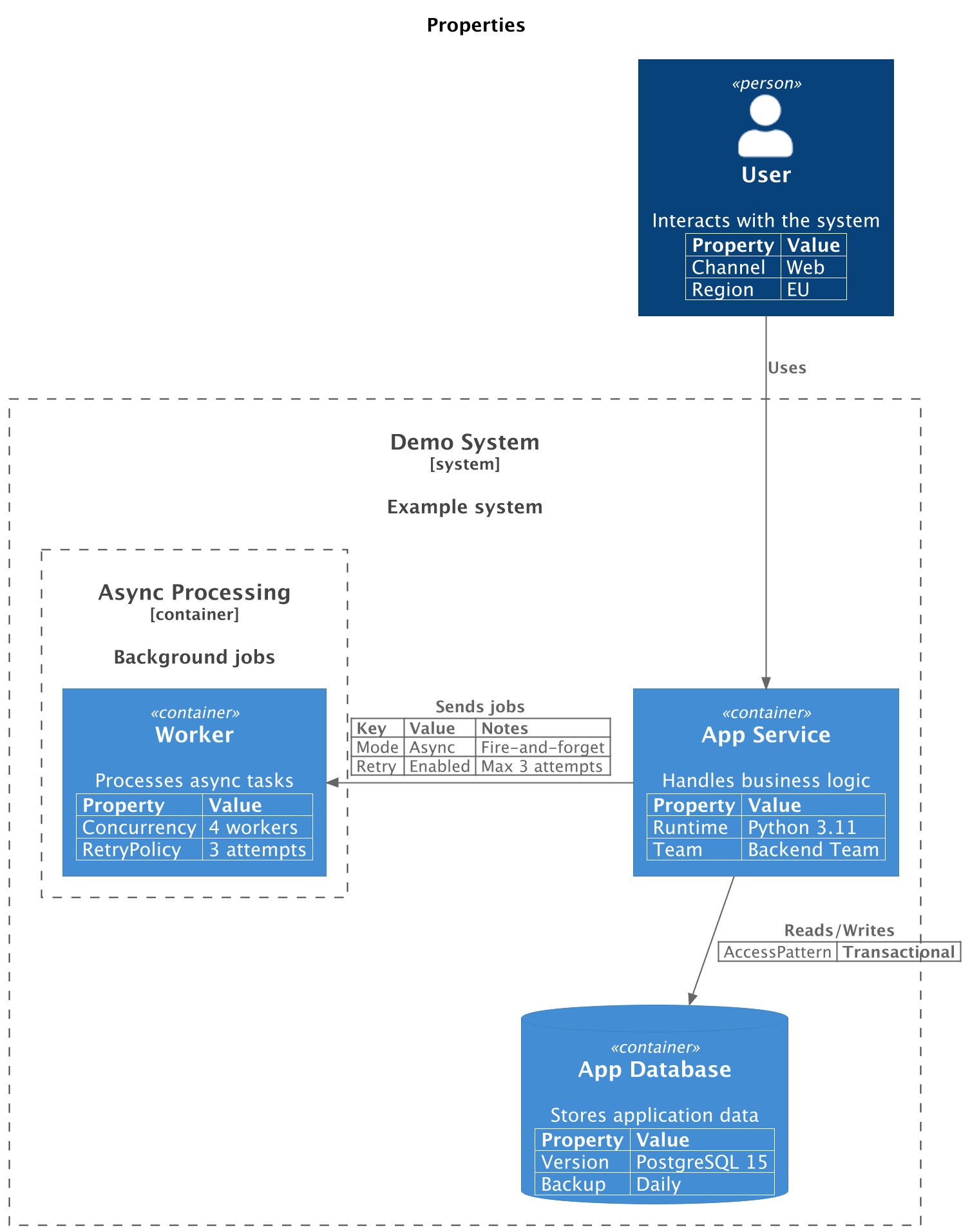
A model can be extended with a table of properties to document additional details:

from c4 import (
    Container,
    ContainerBoundary,
    ContainerDb,
    ContainerDiagram,
    Person,
    Rel,
    SystemBoundary,
)
from c4.contrib.plantuml import RelLeft


with ContainerDiagram(title="Properties") as diagram:
    user = Person("User", "Interacts with the system")
    user.add_property("Channel", "Web")
    user.add_property("Region", "EU")

    with SystemBoundary("Demo System", "Example system"):
        app = Container("App Service", "Handles business logic")
        app.add_property("Runtime", "Python 3.11")
        app.add_property("Team", "Backend Team")

        db = ContainerDb("App Database", "Stores application data")
        db.add_property("Version", "PostgreSQL 15")
        db.add_property("Backup", "Daily")

        with ContainerBoundary("Async Processing", "Background jobs"):
            queue = Container("Worker", "Processes async tasks")
            queue.add_property("Concurrency", "4 workers")
            queue.add_property("RetryPolicy", "3 attempts")

    user_app_rel = user >> Rel("Uses") >> app

    app_queue_rel = app >> RelLeft("Sends jobs") >> queue
    app_queue_rel.set_property_header("Key", "Value", "Notes")
    app_queue_rel.add_property("Mode", "Async", "Fire-and-forget")
    app_queue_rel.add_property("Retry", "Enabled", "Max 3 attempts")

    app_db_rel: Rel = app >> Rel("Reads/Writes") >> db
    app_db_rel.add_property("AccessPattern", "Transactional")
    app_db_rel.without_property_header()


This produces the following diagram:
properties

API

  • add_property(*args: str)

    Adds a row to the property table. The number of values must match the number of columns in the header. This is the step-by-step alternative when properties are added conditionally or built one row at a time:

    app = Container("App Service", "Handles business logic")
    app.add_property("Runtime", "Python 3.12")
    app.add_property("Team", "Platform")
    
  • with_properties(*properties, header=None, show_header=True)

    Adds one or more rows to the property table and returns the element. This is available as BaseDiagramElement.with_properties. For one row, pass values directly; for multiple rows, pass row sequences. Use this form when the element is already being created in-place and you want to keep its properties next to the constructor:

    app = Container("App Service", "Handles business logic").with_properties(
        ("Runtime", "Python 3.12"),
        ("Team", "Platform"),
    )
    

    The top-level with_properties function can add the same rows to an existing element:

    from c4 import Container, with_properties
    
    
    app = with_properties(
        Container("App Service", "Handles business logic"),
        ("Runtime", "Python 3.12"),
        ("Team", "Platform"),
    )
    

    It can also wrap a reusable element factory. Every element created by the wrapped factory receives the same property rows:

    from functools import partial
    
    from c4 import Container, with_properties
    
    
    PlatformContainer = with_properties(
        partial(Container, description="Owned by the platform team."),
        ("Team", "Platform"),
        ("Support", "24/7"),
    )
    
    app = PlatformContainer(label="App Service")
    worker = PlatformContainer(label="Worker Service")
    
  • set_property_header(*args: str)

    Sets the column headers for the property table. This must be called before adding any property rows, unless the new header has the same number of columns as the existing rows. The default header is ("Property", "Value").

  • without_property_header

    Disables rendering of the header row for the property table.

Supported elements

Properties can be added to diagram elements and relationships supported by C4-PlantUML. They are emitted as C4-PlantUML property macros before the target element or relationship.