Container Diagram
A container diagram zooms into one software system and shows its applications, data stores, message brokers, and other deployable or runnable parts. It is most useful for software developers, operators, and technical stakeholders who need to understand responsibilities, technology choices, and communication paths.
Supported DSL Classes
Use ContainerDiagram with:
Personand external peopleContainer,ContainerDb,ContainerQueue, and external variantsSystemBoundaryfor the system being decomposedContainerBoundarywhen you need a portable boundary around grouped containers- portable
Rel
Containers with nested elements
C4-PlantUML containers can visually act like boundaries and contain nested elements. The portable DSL keeps containers and boundaries as separate concepts so the model behaves consistently across renderers.
Use ContainerBoundary for
portable grouping. Renderer-specific container nesting may be added later
as a backend extension; it should not be treated as portable C4 model data.
Portable Example
from c4 import Container, ContainerDb, ContainerDiagram, Person, Rel, SystemBoundary


with ContainerDiagram(title="Retail Platform containers") as diagram:
    customer = Person("Customer", "Places orders through the storefront.")

    with SystemBoundary("Retail Platform"):
        web = Container("Web Application", "Serves the storefront.", "Next.js")
        api = Container("Backend API", "Handles checkout and orders.", "Python")
        db = ContainerDb("Orders Database", "Stores order data.", "PostgreSQL")

    customer >> Rel("Uses", "HTTPS") >> web
    web >> Rel("Calls", "JSON/HTTPS") >> api
    api >> Rel("Reads and writes", "SQL") >> db

plantuml_source = diagram.as_plantuml()
mermaid_source = diagram.as_mermaid()
PlantUML enhanced example
Non-portable PlantUML example
This snippet uses PlantUML extension data and helpers. Render it with the PlantUML rendering backend, or remove those hints before targeting Mermaid.
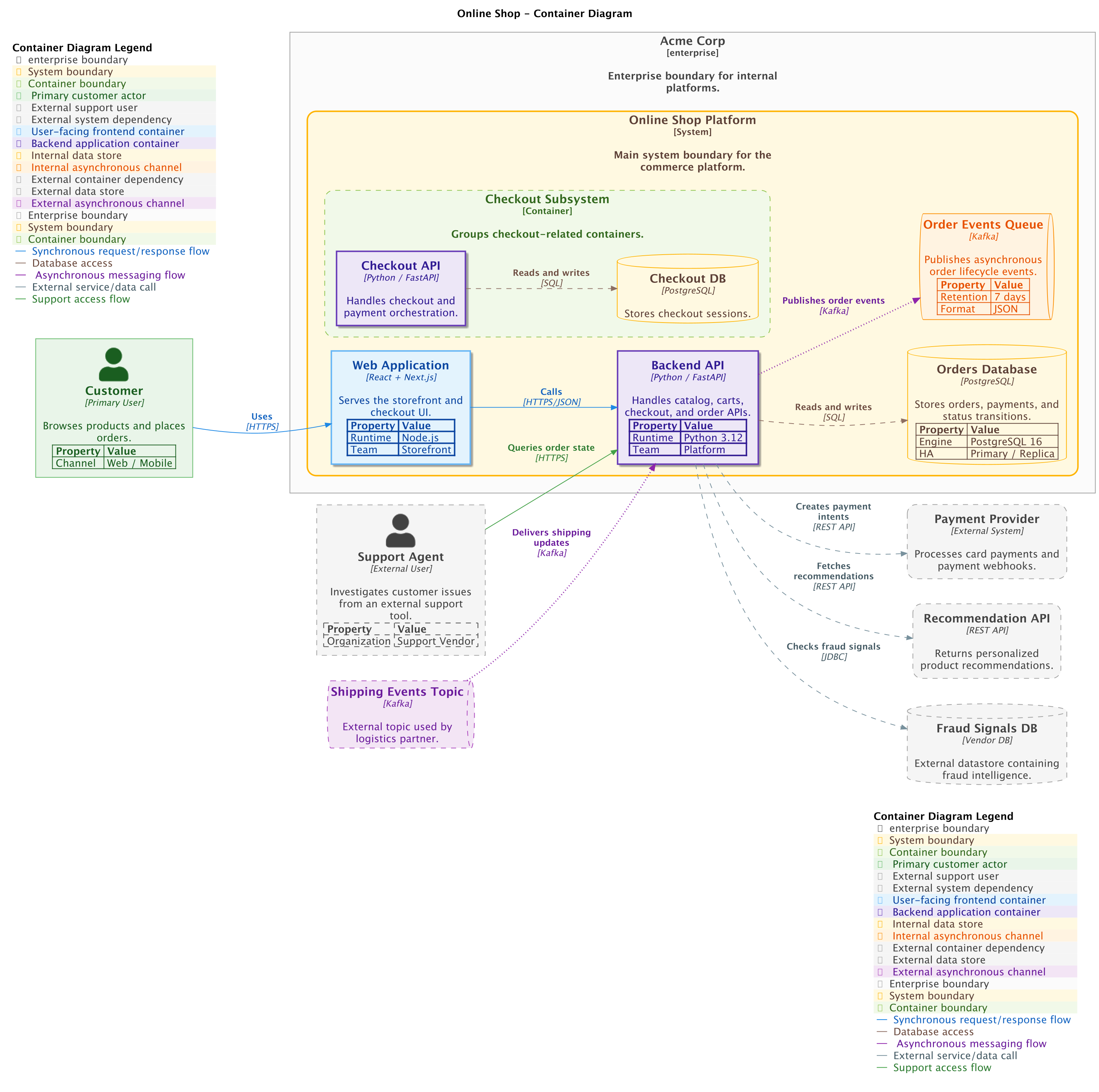
The generated PlantUML example uses element tags, layout helpers, and a legend.
Tags are passed with plantuml={...} and layout helpers are imported from
c4.contrib.plantuml.
from c4 import (
    Container,
    ContainerBoundary,
    ContainerDb,
    ContainerDbExt,
    ContainerDiagram,
    ContainerExt,
    ContainerQueue,
    ContainerQueueExt,
    EnterpriseBoundary,
    Person,
    PersonExt,
    Rel,
    SystemBoundary,
    SystemExt,
)
from c4.contrib.plantuml import (
    LayD,
    LayR,
)
from c4.renderers import (
    PlantUMLRenderOptionsBuilder,
)


with ContainerDiagram(title='Online Shop - Container Diagram') as diagram:
    customer = Person('Customer', 'Browses products and places orders.', plantuml={'tags': ['Customer'], 'type': 'Primary User'}, alias='customer')
    customer.add_property('Channel', 'Web / Mobile')

    support_agent = PersonExt('Support Agent', 'Investigates customer issues from an external support tool.', plantuml={'tags': ['ExternalSupport'], 'type': 'External User'}, alias='support_agent')
    support_agent.add_property('Organization', 'Support Vendor')

    payment_provider = SystemExt('Payment Provider', 'Processes card payments and payment webhooks.', plantuml={'tags': ['ExternalSystem'], 'type': 'External System'}, alias='payment_provider')

    recommendation_api = ContainerExt('Recommendation API', 'Returns personalized product recommendations.', plantuml={'tags': ['ExternalContainer']}, technology='REST API', alias='recommendation_api')

    fraud_db = ContainerDbExt('Fraud Signals DB', 'External datastore containing fraud intelligence.', plantuml={'tags': ['ExternalDataStore']}, technology='Vendor DB', alias='fraud_db')

    shipping_events = ContainerQueueExt('Shipping Events Topic', 'External topic used by logistics partner.', plantuml={'tags': ['ExternalAsyncChannel']}, technology='Kafka', alias='shipping_events')

    with EnterpriseBoundary('Acme Corp', 'Enterprise boundary for internal platforms.', plantuml={'tags': ['EnterpriseBoundary']}, alias='acme'):
        with SystemBoundary('Online Shop Platform', 'Main system boundary for the commerce platform.', plantuml={'tags': ['SystemBoundary']}, alias='shop_boundary'):
            web_app = Container('Web Application', 'Serves the storefront and checkout UI.', plantuml={'tags': ['Frontend']}, technology='React + Next.js', alias='web_app')
            web_app.add_property('Runtime', 'Node.js')
            web_app.add_property('Team', 'Storefront')

            backend_api = Container('Backend API', 'Handles catalog, carts, checkout, and order APIs.', plantuml={'tags': ['Backend', 'CoreRuntime']}, technology='Python / FastAPI', alias='backend_api')
            backend_api.add_property('Runtime', 'Python 3.12')
            backend_api.add_property('Team', 'Platform')

            orders_db = ContainerDb('Orders Database', 'Stores orders, payments, and status transitions.', plantuml={'tags': ['DataStore']}, technology='PostgreSQL', alias='orders_db')
            orders_db.add_property('Engine', 'PostgreSQL 16')
            orders_db.add_property('HA', 'Primary / Replica')

            order_events = ContainerQueue('Order Events Queue', 'Publishes asynchronous order lifecycle events.', plantuml={'tags': ['AsyncChannel']}, technology='Kafka', alias='order_events')
            order_events.add_property('Retention', '7 days')
            order_events.add_property('Format', 'JSON')

            with ContainerBoundary('Checkout Subsystem', 'Groups checkout-related containers.', plantuml={'tags': ['ContainerBoundary']}, alias='checkout_boundary'):
                checkout_api = Container('Checkout API', 'Handles checkout and payment orchestration.', plantuml={'tags': ['Backend']}, technology='Python / FastAPI', alias='checkout_api')

                checkout_db = ContainerDb('Checkout DB', 'Stores checkout sessions.', plantuml={'tags': ['DataStore']}, technology='PostgreSQL', alias='checkout_db')

                checkout_api >> Rel('Reads and writes', technology='SQL', plantuml={'tags': ['DataAccess']}) >> checkout_db

    customer >> Rel('Uses', technology='HTTPS', plantuml={'tags': ['SyncRequest']}) >> web_app
    web_app >> Rel('Calls', technology='HTTPS/JSON', plantuml={'tags': ['SyncRequest']}) >> backend_api
    backend_api >> Rel('Reads and writes', technology='SQL', plantuml={'tags': ['DataAccess']}) >> orders_db
    backend_api >> Rel('Publishes order events', technology='Kafka', plantuml={'tags': ['AsyncRequest']}) >> order_events
    backend_api >> Rel('Creates payment intents', technology='REST API', plantuml={'tags': ['ExternalCall']}) >> payment_provider
    backend_api >> Rel('Fetches recommendations', technology='REST API', plantuml={'tags': ['ExternalCall']}) >> recommendation_api
    backend_api >> Rel('Checks fraud signals', technology='JDBC', plantuml={'tags': ['ExternalCall']}) >> fraud_db
    shipping_events >> Rel('Delivers shipping updates', technology='Kafka', plantuml={'tags': ['AsyncRequest']}) >> backend_api
    support_agent >> Rel('Queries order state', technology='HTTPS', plantuml={'tags': ['SupportFlow']}) >> backend_api
    LayR(customer, web_app)

    LayR(web_app, backend_api)

    LayD(backend_api, orders_db)

    LayD(backend_api, order_events)

    LayR(backend_api, payment_provider)


plantuml_render_options = (
    PlantUMLRenderOptionsBuilder()
    .layout_left_right(
        with_legend=True,
    )
    .set_sketch_style(
        bg_color='#ffffff',
        font_color='#222222',
        warning_color='#cc3300',
        font_name='Inter',
        footer_warning='Architecture draft',
        footer_text='Container view',
    )
    .show_legend(
        hide_stereotype=False,
        details='Normal',
    )
    .show_floating_legend(
        alias='legend_box',
    )
    .update_legend_title(
        'Container Diagram Legend',
    )
    .show_person_outline()
    .show_person_sprite(
        'person',
    )
    .add_person_tag(
        tag_stereo='Customer',
        bg_color='#e8f5e9',
        font_color='#1b5e20',
        border_color='#66bb6a',
        shadowing=False,
        legend_text='Primary customer actor',
        legend_sprite='user',
        border_style='SolidLine',
        border_thickness='1',
    )
    .add_external_person_tag(
        tag_stereo='ExternalSupport',
        bg_color='#f5f5f5',
        font_color='#424242',
        border_color='#9e9e9e',
        shadowing=False,
        legend_text='External support user',
        legend_sprite='user',
        border_style='DashedLine',
        border_thickness='1',
    )
    .add_external_system_tag(
        tag_stereo='ExternalSystem',
        bg_color='#f5f5f5',
        font_color='#424242',
        border_color='#9e9e9e',
        shadowing=False,
        shape='RoundedBoxShape',
        legend_text='External system dependency',
        legend_sprite='cloud',
        border_style='DashedLine',
        border_thickness='1',
    )
    .add_container_tag(
        tag_stereo='Frontend',
        bg_color='#e3f2fd',
        font_color='#0d47a1',
        border_color='#64b5f6',
        shadowing=True,
        technology='Web UI',
        legend_text='User-facing frontend container',
        legend_sprite='browser',
        border_style='SolidLine',
        border_thickness='2',
    )
    .add_container_tag(
        tag_stereo='Backend',
        bg_color='#ede7f6',
        font_color='#311b92',
        border_color='#673ab7',
        shadowing=True,
        technology='Python / FastAPI',
        legend_text='Backend application container',
        legend_sprite='server',
        border_style='SolidLine',
        border_thickness='2',
    )
    .add_container_tag(
        tag_stereo='CoreRuntime',
        bg_color='#ede7f6',
        font_color='#4527a0',
        border_color='#7e57c2',
        shadowing=True,
        technology='Python 3.12',
        legend_text='Core runtime container',
        legend_sprite='server',
        border_style='BoldLine',
        border_thickness='2',
    )
    .add_container_tag(
        tag_stereo='DataStore',
        bg_color='#fff8e1',
        font_color='#5d4037',
        border_color='#ffb300',
        shadowing=False,
        technology='PostgreSQL',
        legend_text='Internal data store',
        legend_sprite='database',
        border_style='SolidLine',
        border_thickness='1',
    )
    .add_container_tag(
        tag_stereo='AsyncChannel',
        bg_color='#fff3e0',
        font_color='#e65100',
        border_color='#fb8c00',
        shadowing=False,
        technology='Kafka',
        legend_text='Internal asynchronous channel',
        legend_sprite='queue',
        border_style='SolidLine',
        border_thickness='1',
    )
    .add_external_container_tag(
        tag_stereo='ExternalContainer',
        bg_color='#f5f5f5',
        font_color='#424242',
        border_color='#9e9e9e',
        shadowing=False,
        shape='RoundedBoxShape',
        technology='REST API',
        legend_text='External container dependency',
        legend_sprite='cloud',
        border_style='DashedLine',
        border_thickness='1',
    )
    .add_external_container_tag(
        tag_stereo='ExternalDataStore',
        bg_color='#f5f5f5',
        font_color='#424242',
        border_color='#9e9e9e',
        shadowing=False,
        technology='Vendor DB',
        legend_text='External data store',
        legend_sprite='database',
        border_style='DashedLine',
        border_thickness='1',
    )
    .add_external_container_tag(
        tag_stereo='ExternalAsyncChannel',
        bg_color='#f3e5f5',
        font_color='#6a1b9a',
        border_color='#ab47bc',
        shadowing=False,
        technology='Kafka',
        legend_text='External asynchronous channel',
        legend_sprite='queue',
        border_style='DashedLine',
        border_thickness='1',
    )
    .add_boundary_tag(
        tag_stereo='EnterpriseBoundary',
        bg_color='#fafafa',
        font_color='#424242',
        border_color='#9e9e9e',
        shadowing=False,
        legend_text='Enterprise boundary',
        border_style='SolidLine',
        border_thickness='1',
    )
    .add_boundary_tag(
        tag_stereo='SystemBoundary',
        bg_color='#fff8e1',
        font_color='#5d4037',
        border_color='#ffb300',
        shadowing=False,
        legend_text='System boundary',
        border_style='SolidLine',
        border_thickness='2',
    )
    .add_boundary_tag(
        tag_stereo='ContainerBoundary',
        bg_color='#f1f8e9',
        font_color='#33691e',
        border_color='#8bc34a',
        shadowing=False,
        legend_text='Container boundary',
        border_style='DashedLine',
        border_thickness='1',
    )
    .add_rel_tag(
        tag_stereo='SyncRequest',
        text_color='#1565c0',
        line_color='#1e88e5',
        technology='HTTPS/JSON',
        legend_text='Synchronous request/response flow',
        line_style='SolidLine',
        line_thickness='1',
    )
    .add_rel_tag(
        tag_stereo='DataAccess',
        text_color='#6d4c41',
        line_color='#8d6e63',
        technology='SQL',
        legend_text='Database access',
        line_style='DashedLine',
        line_thickness='1',
    )
    .add_rel_tag(
        tag_stereo='AsyncRequest',
        text_color='#6a1b9a',
        line_color='#8e24aa',
        technology='Kafka',
        legend_text='Asynchronous messaging flow',
        legend_sprite='queue',
        line_style='DottedLine',
        line_thickness='2',
    )
    .add_rel_tag(
        tag_stereo='ExternalCall',
        text_color='#455a64',
        line_color='#78909c',
        technology='REST API / JDBC',
        legend_text='External service/data call',
        line_style='DashedLine',
        line_thickness='1',
    )
    .add_rel_tag(
        tag_stereo='SupportFlow',
        text_color='#2e7d32',
        line_color='#43a047',
        technology='HTTPS',
        legend_text='Support access flow',
        line_style='SolidLine',
        line_thickness='1',
    )
    .update_element_style(
        element_name='container',
        bg_color='#ede7f6',
        font_color='#311b92',
        border_color='#673ab7',
        shadowing=True,
        shape='RoundedBoxShape',
        legend_text='Application container',
        legend_sprite='server',
        border_style='SolidLine',
        border_thickness='2',
    )
    .update_system_boundary_style(
        bg_color='#fff8e1',
        font_color='#5d4037',
        border_color='#ffb300',
        shadowing=False,
        shape='RoundedBoxShape',
        legend_text='System boundary',
        border_style='SolidLine',
        border_thickness='2',
    )
    .update_container_boundary_style(
        bg_color='#f1f8e9',
        font_color='#33691e',
        border_color='#8bc34a',
        shadowing=False,
        shape='RoundedBoxShape',
        legend_text='Container boundary',
        border_style='DashedLine',
        border_thickness='1',
    )
    .update_rel_style(
        text_color='#37474f',
        line_color='#546e7a',
    )
    .build()
)

diagram.set_render_options(
    plantuml=plantuml_render_options,
)
Renderer Behavior
PlantUML supports C4-PlantUML container rendering, tags, styles, legends, and layout hints. Mermaid can render the portable container model and Mermaid style options, but it does not understand PlantUML-only layout helpers, sprites, or PlantUML tag styling.
Generated Source and Image
Generated PlantUML source
@startuml
' convert it with additional command line argument -DRELATIVE_INCLUDE="relative/absolute" to use locally
!if %variable_exists("RELATIVE_INCLUDE")
    !include %get_variable_value("RELATIVE_INCLUDE")/C4_Container.puml
!else
    !include https://raw.githubusercontent.com/plantuml-stdlib/C4-PlantUML/master/C4_Container.puml
!endif

AddPersonTag("Customer", $bgColor="#e8f5e9", $fontColor="#1b5e20", $borderColor="#66bb6a", $shadowing="false", $legendText="Primary customer actor", $legendSprite="user", $borderStyle=SolidLine(), $borderThickness="1")
AddExternalPersonTag("ExternalSupport", $bgColor="#f5f5f5", $fontColor="#424242", $borderColor="#9e9e9e", $shadowing="false", $legendText="External support user", $legendSprite="user", $borderStyle=DashedLine(), $borderThickness="1")
AddExternalSystemTag("ExternalSystem", $bgColor="#f5f5f5", $fontColor="#424242", $borderColor="#9e9e9e", $shadowing="false", $shape=RoundedBoxShape(), $legendText="External system dependency", $legendSprite="cloud", $borderStyle=DashedLine(), $borderThickness="1")
AddContainerTag("Frontend", $bgColor="#e3f2fd", $fontColor="#0d47a1", $borderColor="#64b5f6", $shadowing="true", $techn="Web UI", $legendText="User-facing frontend container", $legendSprite="browser", $borderStyle=SolidLine(), $borderThickness="2")
AddContainerTag("Backend", $bgColor="#ede7f6", $fontColor="#311b92", $borderColor="#673ab7", $shadowing="true", $techn="Python / FastAPI", $legendText="Backend application container", $legendSprite="server", $borderStyle=SolidLine(), $borderThickness="2")
AddContainerTag("CoreRuntime", $bgColor="#ede7f6", $fontColor="#4527a0", $borderColor="#7e57c2", $shadowing="true", $techn="Python 3.12", $legendText="Core runtime container", $legendSprite="server", $borderStyle=BoldLine(), $borderThickness="2")
AddContainerTag("DataStore", $bgColor="#fff8e1", $fontColor="#5d4037", $borderColor="#ffb300", $shadowing="false", $techn="PostgreSQL", $legendText="Internal data store", $legendSprite="database", $borderStyle=SolidLine(), $borderThickness="1")
AddContainerTag("AsyncChannel", $bgColor="#fff3e0", $fontColor="#e65100", $borderColor="#fb8c00", $shadowing="false", $techn="Kafka", $legendText="Internal asynchronous channel", $legendSprite="queue", $borderStyle=SolidLine(), $borderThickness="1")
AddExternalContainerTag("ExternalContainer", $bgColor="#f5f5f5", $fontColor="#424242", $borderColor="#9e9e9e", $shadowing="false", $shape=RoundedBoxShape(), $techn="REST API", $legendText="External container dependency", $legendSprite="cloud", $borderStyle=DashedLine(), $borderThickness="1")
AddExternalContainerTag("ExternalDataStore", $bgColor="#f5f5f5", $fontColor="#424242", $borderColor="#9e9e9e", $shadowing="false", $techn="Vendor DB", $legendText="External data store", $legendSprite="database", $borderStyle=DashedLine(), $borderThickness="1")
AddExternalContainerTag("ExternalAsyncChannel", $bgColor="#f3e5f5", $fontColor="#6a1b9a", $borderColor="#ab47bc", $shadowing="false", $techn="Kafka", $legendText="External asynchronous channel", $legendSprite="queue", $borderStyle=DashedLine(), $borderThickness="1")
AddBoundaryTag("EnterpriseBoundary", $bgColor="#fafafa", $fontColor="#424242", $borderColor="#9e9e9e", $shadowing="false", $legendText="Enterprise boundary", $borderStyle=SolidLine(), $borderThickness="1")
AddBoundaryTag("SystemBoundary", $bgColor="#fff8e1", $fontColor="#5d4037", $borderColor="#ffb300", $shadowing="false", $legendText="System boundary", $borderStyle=SolidLine(), $borderThickness="2")
AddBoundaryTag("ContainerBoundary", $bgColor="#f1f8e9", $fontColor="#33691e", $borderColor="#8bc34a", $shadowing="false", $legendText="Container boundary", $borderStyle=DashedLine(), $borderThickness="1")
AddRelTag("SyncRequest", $textColor="#1565c0", $lineColor="#1e88e5", $lineStyle=SolidLine(), $techn="HTTPS/JSON", $legendText="Synchronous request/response flow", $lineThickness="1")
AddRelTag("DataAccess", $textColor="#6d4c41", $lineColor="#8d6e63", $lineStyle=DashedLine(), $techn="SQL", $legendText="Database access", $lineThickness="1")
AddRelTag("AsyncRequest", $textColor="#6a1b9a", $lineColor="#8e24aa", $lineStyle=DottedLine(), $techn="Kafka", $legendText="Asynchronous messaging flow", $legendSprite="queue", $lineThickness="2")
AddRelTag("ExternalCall", $textColor="#455a64", $lineColor="#78909c", $lineStyle=DashedLine(), $techn="REST API / JDBC", $legendText="External service/data call", $lineThickness="1")
AddRelTag("SupportFlow", $textColor="#2e7d32", $lineColor="#43a047", $lineStyle=SolidLine(), $techn="HTTPS", $legendText="Support access flow", $lineThickness="1")

UpdateElementStyle("container", $bgColor="#ede7f6", $fontColor="#311b92", $borderColor="#673ab7", $shadowing="true", $shape=RoundedBoxShape(), $legendText="Application container", $legendSprite="server", $borderStyle=SolidLine(), $borderThickness="2")
UpdateSystemBoundaryStyle($bgColor="#fff8e1", $fontColor="#5d4037", $borderColor="#ffb300", $shadowing="false", $shape=RoundedBoxShape(), $legendText="System boundary", $borderStyle=SolidLine(), $borderThickness="2")
UpdateContainerBoundaryStyle($bgColor="#f1f8e9", $fontColor="#33691e", $borderColor="#8bc34a", $shadowing="false", $shape=RoundedBoxShape(), $legendText="Container boundary", $borderStyle=DashedLine(), $borderThickness="1")
UpdateRelStyle($textColor="#37474f", $lineColor="#546e7a")

LAYOUT_LEFT_RIGHT()
LAYOUT_WITH_LEGEND()
SHOW_PERSON_SPRITE("person")
SHOW_PERSON_OUTLINE()
UpdateLegendTitle("Container Diagram Legend")

SET_SKETCH_STYLE($bgColor="#ffffff", $fontColor="#222222", $warningColor="#cc3300", $fontName="Inter", $footerWarning="Architecture draft", $footerText="Container view")

title Online Shop - Container Diagram

SetPropertyHeader("Property", "Value")
AddProperty("Channel", "Web / Mobile")
Person(customer, "Customer", "Browses products and places orders.", $tags="Customer", $type="Primary User")

SetPropertyHeader("Property", "Value")
AddProperty("Organization", "Support Vendor")
Person_Ext(support_agent, "Support Agent", "Investigates customer issues from an external support tool.", $tags="ExternalSupport", $type="External User")

System_Ext(payment_provider, "Payment Provider", "Processes card payments and payment webhooks.", $tags="ExternalSystem", $type="External System")

Container_Ext(recommendation_api, "Recommendation API", "REST API", "Returns personalized product recommendations.", $tags="ExternalContainer")

ContainerDb_Ext(fraud_db, "Fraud Signals DB", "Vendor DB", "External datastore containing fraud intelligence.", $tags="ExternalDataStore")

ContainerQueue_Ext(shipping_events, "Shipping Events Topic", "Kafka", "External topic used by logistics partner.", $tags="ExternalAsyncChannel")

Enterprise_Boundary(acme, "Acme Corp", $tags="EnterpriseBoundary", $descr="Enterprise boundary for internal platforms.") {
    System_Boundary(shop_boundary, "Online Shop Platform", $tags="SystemBoundary", $descr="Main system boundary for the commerce platform.") {
        SetPropertyHeader("Property", "Value")
        AddProperty("Runtime", "Node.js")
        AddProperty("Team", "Storefront")
        Container(web_app, "Web Application", "React + Next.js", "Serves the storefront and checkout UI.", $tags="Frontend")
        SetPropertyHeader("Property", "Value")
        AddProperty("Runtime", "Python 3.12")
        AddProperty("Team", "Platform")
        Container(backend_api, "Backend API", "Python / FastAPI", "Handles catalog, carts, checkout, and order APIs.", $tags="Backend+CoreRuntime")
        SetPropertyHeader("Property", "Value")
        AddProperty("Engine", "PostgreSQL 16")
        AddProperty("HA", "Primary / Replica")
        ContainerDb(orders_db, "Orders Database", "PostgreSQL", "Stores orders, payments, and status transitions.", $tags="DataStore")
        SetPropertyHeader("Property", "Value")
        AddProperty("Retention", "7 days")
        AddProperty("Format", "JSON")
        ContainerQueue(order_events, "Order Events Queue", "Kafka", "Publishes asynchronous order lifecycle events.", $tags="AsyncChannel")
        Container_Boundary(checkout_boundary, "Checkout Subsystem", $tags="ContainerBoundary", $descr="Groups checkout-related containers.") {
            Container(checkout_api, "Checkout API", "Python / FastAPI", "Handles checkout and payment orchestration.", $tags="Backend")
            ContainerDb(checkout_db, "Checkout DB", "PostgreSQL", "Stores checkout sessions.", $tags="DataStore")
            Rel(checkout_api, checkout_db, "Reads and writes", "SQL", $tags="DataAccess")
        }
    }
}

Rel(customer, web_app, "Uses", "HTTPS", $tags="SyncRequest")
Rel(web_app, backend_api, "Calls", "HTTPS/JSON", $tags="SyncRequest")
Rel(backend_api, orders_db, "Reads and writes", "SQL", $tags="DataAccess")
Rel(backend_api, order_events, "Publishes order events", "Kafka", $tags="AsyncRequest")
Rel(backend_api, payment_provider, "Creates payment intents", "REST API", $tags="ExternalCall")
Rel(backend_api, recommendation_api, "Fetches recommendations", "REST API", $tags="ExternalCall")
Rel(backend_api, fraud_db, "Checks fraud signals", "JDBC", $tags="ExternalCall")
Rel(shipping_events, backend_api, "Delivers shipping updates", "Kafka", $tags="AsyncRequest")
Rel(support_agent, backend_api, "Queries order state", "HTTPS", $tags="SupportFlow")
Lay_R(customer, web_app)
Lay_R(web_app, backend_api)
Lay_D(backend_api, orders_db)
Lay_D(backend_api, order_events)
Lay_R(backend_api, payment_provider)

SHOW_LEGEND($hideStereotype="false", $details=Normal())

SHOW_FLOATING_LEGEND("legend_box", $hideStereotype="true", $details=Small())

@enduml