Component Diagram
A component diagram zooms into one container and shows the major components inside it. It is aimed at engineers who need to understand responsibilities, internal dependencies, and how a container connects back to neighboring containers and external systems.
Supported DSL Classes
Use ComponentDiagram with:
Component,ComponentDb,ComponentQueue, and external variants- surrounding
ContainerandContainerDbelements for dependencies ContainerBoundaryfor the container being decomposed- portable
Rel
Portable Example
from c4 import Component, ComponentDiagram, Container, ContainerBoundary, Rel, SystemExt


with ComponentDiagram(title="Backend API components") as diagram:
    spa = Container("Single Page Application", "Browser UI.", "React")
    payments = SystemExt("Payment Gateway", "Authorizes payments.")

    with ContainerBoundary("Backend API"):
        checkout = Component("Checkout Controller", "Accepts checkout requests.")
        payment_client = Component("Payment Client", "Calls the payment API.")

    spa >> Rel("Submits checkout", "JSON/HTTPS") >> checkout
    checkout >> Rel("Uses") >> payment_client
    payment_client >> Rel("Authorizes card", "REST API") >> payments

plantuml_source = diagram.as_plantuml()
mermaid_source = diagram.as_mermaid()
PlantUML enhanced example
Non-portable PlantUML example
This snippet uses PlantUML extension data and renderer options. Render it with the PlantUML rendering backend when keeping those hints.
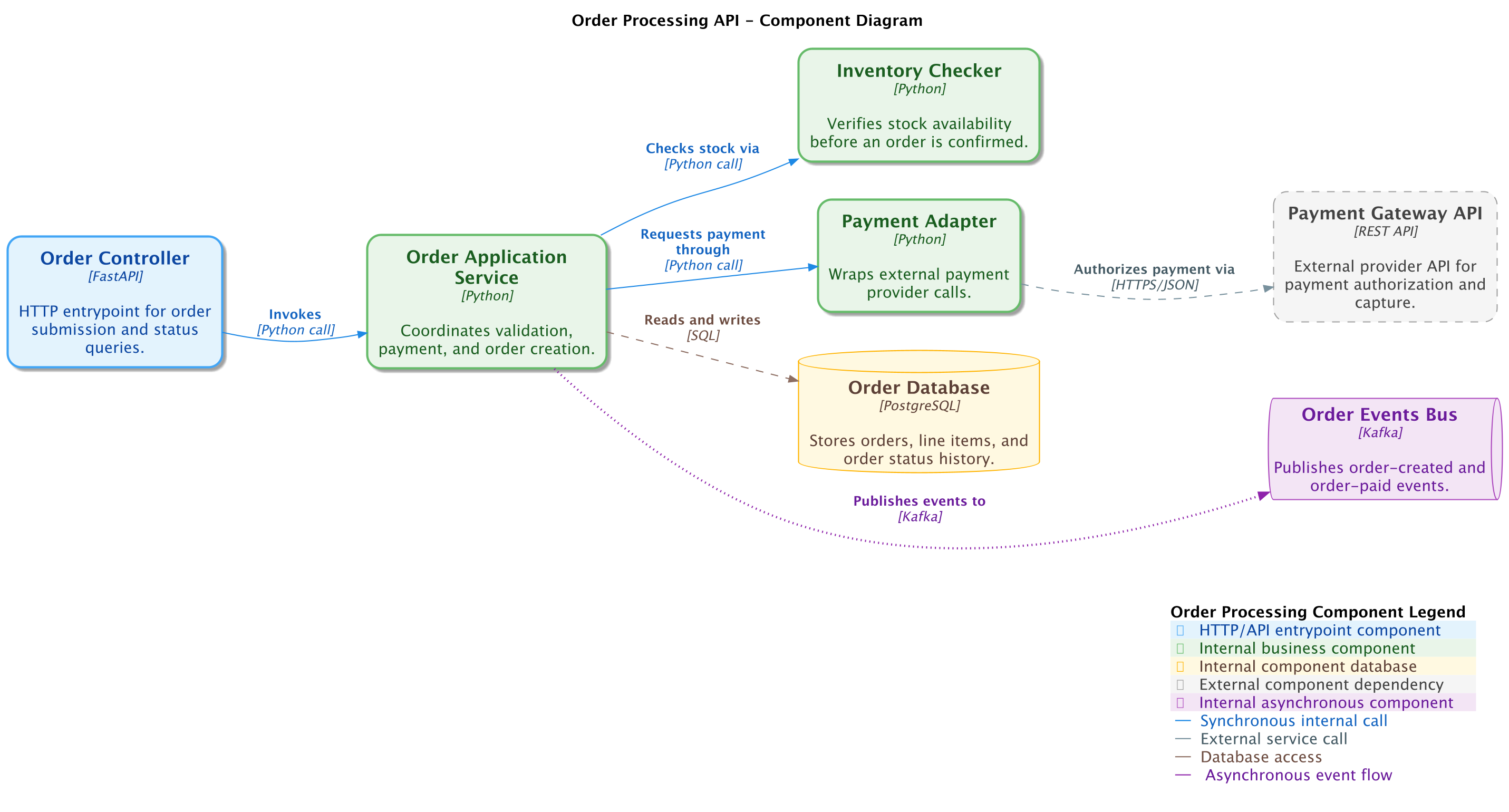
The generated PlantUML example demonstrates the same component model with PlantUML render options and source output.
from c4 import (
    Component,
    ComponentDb,
    ComponentDiagram,
    ComponentExt,
    ComponentQueue,
    Rel,
)
from c4.contrib.plantuml import (
    LayD,
    LayR,
)
from c4.renderers import (
    PlantUMLRenderOptionsBuilder,
)


with ComponentDiagram(title='Order Processing API - Component Diagram') as diagram:
    order_controller = Component('Order Controller', 'HTTP entrypoint for order submission and status queries.', plantuml={'tags': ['Entrypoint', 'CoreComponent']}, technology='FastAPI', alias='order_controller')

    order_app_service = Component('Order Application Service', 'Coordinates validation, payment, and order creation.', plantuml={'tags': ['CoreComponent', 'Orders']}, technology='Python', alias='order_app_service')

    inventory_checker = Component('Inventory Checker', 'Verifies stock availability before an order is confirmed.', plantuml={'tags': ['CoreComponent']}, technology='Python', alias='inventory_checker')

    payment_adapter = Component('Payment Adapter', 'Wraps external payment provider calls.', plantuml={'tags': ['CoreComponent', 'Payments']}, technology='Python', alias='payment_adapter')

    order_db = ComponentDb('Order Database', 'Stores orders, line items, and order status history.', plantuml={'tags': ['ComponentDatabase']}, technology='PostgreSQL', alias='order_db')

    payment_gateway_api = ComponentExt('Payment Gateway API', 'External provider API for payment authorization and capture.', plantuml={'tags': ['ExternalComponent']}, technology='REST API', alias='payment_gateway_api')

    order_events_bus = ComponentQueue('Order Events Bus', 'Publishes order-created and order-paid events.', plantuml={'tags': ['AsyncComponent']}, technology='Kafka', alias='order_events_bus')

    order_controller >> Rel('Invokes', technology='Python call', plantuml={'tags': ['SyncCall']}) >> order_app_service
    order_app_service >> Rel('Checks stock via', technology='Python call', plantuml={'tags': ['SyncCall']}) >> inventory_checker
    order_app_service >> Rel('Requests payment through', technology='Python call', plantuml={'tags': ['SyncCall']}) >> payment_adapter
    payment_adapter >> Rel('Authorizes payment via', technology='HTTPS/JSON', plantuml={'tags': ['ExternalCall']}) >> payment_gateway_api
    order_app_service >> Rel('Reads and writes', technology='SQL', plantuml={'tags': ['DataAccess']}) >> order_db
    order_app_service >> Rel('Publishes events to', technology='Kafka', plantuml={'tags': ['AsyncFlow']}) >> order_events_bus
    LayR(order_controller, order_app_service)

    LayR(order_app_service, inventory_checker)

    LayD(order_app_service, order_db)

    LayR(inventory_checker, payment_adapter)

    LayR(payment_adapter, payment_gateway_api)

    LayD(payment_adapter, order_events_bus)


plantuml_render_options = (
    PlantUMLRenderOptionsBuilder()
    .layout_left_right(
        with_legend=True,
    )
    .show_legend(
        hide_stereotype=False,
        details='Normal',
    )
    .update_legend_title(
        'Order Processing Component Legend',
    )
    .add_component_tag(
        tag_stereo='Entrypoint',
        bg_color='#e3f2fd',
        font_color='#0d47a1',
        border_color='#42a5f5',
        shadowing=True,
        shape='RoundedBoxShape',
        technology='FastAPI',
        legend_text='HTTP/API entrypoint component',
        legend_sprite='server',
        border_style='BoldLine',
        border_thickness='2',
    )
    .add_component_tag(
        tag_stereo='CoreComponent',
        bg_color='#e8f5e9',
        font_color='#1b5e20',
        border_color='#66bb6a',
        shadowing=True,
        shape='RoundedBoxShape',
        technology='Python',
        legend_text='Internal business component',
        legend_sprite='server',
        border_style='SolidLine',
        border_thickness='2',
    )
    .add_component_tag(
        tag_stereo='Orders',
        bg_color='#fff3e0',
        font_color='#e65100',
        border_color='#fb8c00',
        shadowing=True,
        shape='RoundedBoxShape',
        technology='Python',
        legend_text='Order management component',
        legend_sprite='server',
        border_style='SolidLine',
        border_thickness='2',
    )
    .add_component_tag(
        tag_stereo='Payments',
        bg_color='#ede7f6',
        font_color='#311b92',
        border_color='#7e57c2',
        shadowing=True,
        shape='RoundedBoxShape',
        technology='Python',
        legend_text='Payment-related component',
        legend_sprite='server',
        border_style='SolidLine',
        border_thickness='2',
    )
    .add_component_tag(
        tag_stereo='ComponentDatabase',
        bg_color='#fff8e1',
        font_color='#5d4037',
        border_color='#ffb300',
        shadowing=False,
        shape='RoundedBoxShape',
        technology='PostgreSQL',
        legend_text='Internal component database',
        legend_sprite='database',
        border_style='SolidLine',
        border_thickness='1',
    )
    .add_external_component_tag(
        tag_stereo='ExternalComponent',
        bg_color='#f5f5f5',
        font_color='#424242',
        border_color='#9e9e9e',
        shadowing=False,
        shape='RoundedBoxShape',
        technology='REST API',
        legend_text='External component dependency',
        legend_sprite='cloud',
        border_style='DashedLine',
        border_thickness='1',
    )
    .add_component_tag(
        tag_stereo='AsyncComponent',
        bg_color='#f3e5f5',
        font_color='#6a1b9a',
        border_color='#ab47bc',
        shadowing=False,
        shape='RoundedBoxShape',
        technology='Kafka',
        legend_text='Internal asynchronous component',
        legend_sprite='queue',
        border_style='SolidLine',
        border_thickness='1',
    )
    .add_rel_tag(
        tag_stereo='SyncCall',
        text_color='#1565c0',
        line_color='#1e88e5',
        technology='Python call',
        legend_text='Synchronous internal call',
        line_style='SolidLine',
        line_thickness='1',
    )
    .add_rel_tag(
        tag_stereo='ExternalCall',
        text_color='#455a64',
        line_color='#78909c',
        technology='HTTPS/JSON',
        legend_text='External service call',
        line_style='DashedLine',
        line_thickness='1',
    )
    .add_rel_tag(
        tag_stereo='DataAccess',
        text_color='#6d4c41',
        line_color='#8d6e63',
        technology='SQL',
        legend_text='Database access',
        line_style='DashedLine',
        line_thickness='1',
    )
    .add_rel_tag(
        tag_stereo='AsyncFlow',
        text_color='#6a1b9a',
        line_color='#8e24aa',
        technology='Kafka',
        legend_text='Asynchronous event flow',
        legend_sprite='queue',
        line_style='DottedLine',
        line_thickness='2',
    )
    .update_element_style(
        element_name='component',
        shape='RoundedBoxShape',
        border_style='SolidLine',
    )
    .update_rel_style(
        text_color='#37474f',
        line_color='#546e7a',
    )
    .build()
)

diagram.set_render_options(
    plantuml=plantuml_render_options,
)
Renderer Behavior
PlantUML supports C4-PlantUML component rendering, tags, styles, legends, and layout hints. Mermaid renders the common component subset, but Mermaid C4 is less expressive and may require Mermaid-specific style offsets for readable labels.
Generated Source and Image
Generated PlantUML source
@startuml
' convert it with additional command line argument -DRELATIVE_INCLUDE="relative/absolute" to use locally
!if %variable_exists("RELATIVE_INCLUDE")
    !include %get_variable_value("RELATIVE_INCLUDE")/C4_Component.puml
!else
    !include https://raw.githubusercontent.com/plantuml-stdlib/C4-PlantUML/master/C4_Component.puml
!endif

AddComponentTag("Entrypoint", $bgColor="#e3f2fd", $fontColor="#0d47a1", $borderColor="#42a5f5", $shadowing="true", $shape=RoundedBoxShape(), $techn="FastAPI", $legendText="HTTP/API entrypoint component", $legendSprite="server", $borderStyle=BoldLine(), $borderThickness="2")
AddComponentTag("CoreComponent", $bgColor="#e8f5e9", $fontColor="#1b5e20", $borderColor="#66bb6a", $shadowing="true", $shape=RoundedBoxShape(), $techn="Python", $legendText="Internal business component", $legendSprite="server", $borderStyle=SolidLine(), $borderThickness="2")
AddComponentTag("Orders", $bgColor="#fff3e0", $fontColor="#e65100", $borderColor="#fb8c00", $shadowing="true", $shape=RoundedBoxShape(), $techn="Python", $legendText="Order management component", $legendSprite="server", $borderStyle=SolidLine(), $borderThickness="2")
AddComponentTag("Payments", $bgColor="#ede7f6", $fontColor="#311b92", $borderColor="#7e57c2", $shadowing="true", $shape=RoundedBoxShape(), $techn="Python", $legendText="Payment-related component", $legendSprite="server", $borderStyle=SolidLine(), $borderThickness="2")
AddComponentTag("ComponentDatabase", $bgColor="#fff8e1", $fontColor="#5d4037", $borderColor="#ffb300", $shadowing="false", $shape=RoundedBoxShape(), $techn="PostgreSQL", $legendText="Internal component database", $legendSprite="database", $borderStyle=SolidLine(), $borderThickness="1")
AddExternalComponentTag("ExternalComponent", $bgColor="#f5f5f5", $fontColor="#424242", $borderColor="#9e9e9e", $shadowing="false", $shape=RoundedBoxShape(), $techn="REST API", $legendText="External component dependency", $legendSprite="cloud", $borderStyle=DashedLine(), $borderThickness="1")
AddComponentTag("AsyncComponent", $bgColor="#f3e5f5", $fontColor="#6a1b9a", $borderColor="#ab47bc", $shadowing="false", $shape=RoundedBoxShape(), $techn="Kafka", $legendText="Internal asynchronous component", $legendSprite="queue", $borderStyle=SolidLine(), $borderThickness="1")
AddRelTag("SyncCall", $textColor="#1565c0", $lineColor="#1e88e5", $lineStyle=SolidLine(), $techn="Python call", $legendText="Synchronous internal call", $lineThickness="1")
AddRelTag("ExternalCall", $textColor="#455a64", $lineColor="#78909c", $lineStyle=DashedLine(), $techn="HTTPS/JSON", $legendText="External service call", $lineThickness="1")
AddRelTag("DataAccess", $textColor="#6d4c41", $lineColor="#8d6e63", $lineStyle=DashedLine(), $techn="SQL", $legendText="Database access", $lineThickness="1")
AddRelTag("AsyncFlow", $textColor="#6a1b9a", $lineColor="#8e24aa", $lineStyle=DottedLine(), $techn="Kafka", $legendText="Asynchronous event flow", $legendSprite="queue", $lineThickness="2")

UpdateElementStyle("component", $shape=RoundedBoxShape(), $borderStyle=SolidLine())
UpdateRelStyle($textColor="#37474f", $lineColor="#546e7a")

LAYOUT_LEFT_RIGHT()
LAYOUT_WITH_LEGEND()
UpdateLegendTitle("Order Processing Component Legend")

title Order Processing API - Component Diagram

Component(order_controller, "Order Controller", "FastAPI", "HTTP entrypoint for order submission and status queries.", $tags="Entrypoint+CoreComponent")

Component(order_app_service, "Order Application Service", "Python", "Coordinates validation, payment, and order creation.", $tags="CoreComponent+Orders")

Component(inventory_checker, "Inventory Checker", "Python", "Verifies stock availability before an order is confirmed.", $tags="CoreComponent")

Component(payment_adapter, "Payment Adapter", "Python", "Wraps external payment provider calls.", $tags="CoreComponent+Payments")

ComponentDb(order_db, "Order Database", "PostgreSQL", "Stores orders, line items, and order status history.", $tags="ComponentDatabase")

Component_Ext(payment_gateway_api, "Payment Gateway API", "REST API", "External provider API for payment authorization and capture.", $tags="ExternalComponent")

ComponentQueue(order_events_bus, "Order Events Bus", "Kafka", "Publishes order-created and order-paid events.", $tags="AsyncComponent")

Rel(order_controller, order_app_service, "Invokes", "Python call", $tags="SyncCall")
Rel(order_app_service, inventory_checker, "Checks stock via", "Python call", $tags="SyncCall")
Rel(order_app_service, payment_adapter, "Requests payment through", "Python call", $tags="SyncCall")
Rel(payment_adapter, payment_gateway_api, "Authorizes payment via", "HTTPS/JSON", $tags="ExternalCall")
Rel(order_app_service, order_db, "Reads and writes", "SQL", $tags="DataAccess")
Rel(order_app_service, order_events_bus, "Publishes events to", "Kafka", $tags="AsyncFlow")
Lay_R(order_controller, order_app_service)
Lay_R(order_app_service, inventory_checker)
Lay_D(order_app_service, order_db)
Lay_R(inventory_checker, payment_adapter)
Lay_R(payment_adapter, payment_gateway_api)
Lay_D(payment_adapter, order_events_bus)

SHOW_LEGEND($hideStereotype="false", $details=Normal())

@enduml