System Context Diagram
A system context diagram shows one software system in its environment. It is usually the first C4 view for a product or service, and is aimed at both technical and non-technical readers who need to understand users, neighboring systems, and major integrations.
Supported DSL Classes
Use SystemContextDiagram
with people, systems, system boundaries, and enterprise boundaries:
PersonandPersonExtSystem,SystemExt,SystemDb, and queue variantsSystemBoundaryandEnterpriseBoundary- portable
Rel
PlantUML relationship direction helpers and layout helpers are available from
c4.contrib.plantuml, but they are
PlantUML-specific rendering hints rather than portable model data.
Portable Example
from c4 import Person, Rel, System, SystemContextDiagram, SystemExt


with SystemContextDiagram(title="Retail Platform context") as diagram:
    customer = Person("Customer", "Places orders through the storefront.")
    retail = System("Retail Platform", "Catalog, checkout, and order management.")
    payments = SystemExt("Payment Gateway", "Processes card payments.")

    customer >> Rel("Browses and places orders", "HTTPS") >> retail
    retail >> Rel("Charges card", "REST API") >> payments

plantuml_source = diagram.as_plantuml()
mermaid_source = diagram.as_mermaid()
PlantUML enhanced example
Non-portable PlantUML example
This snippet uses PlantUML extension data and helpers. Render it with the PlantUML rendering backend, or remove those hints before targeting Mermaid.
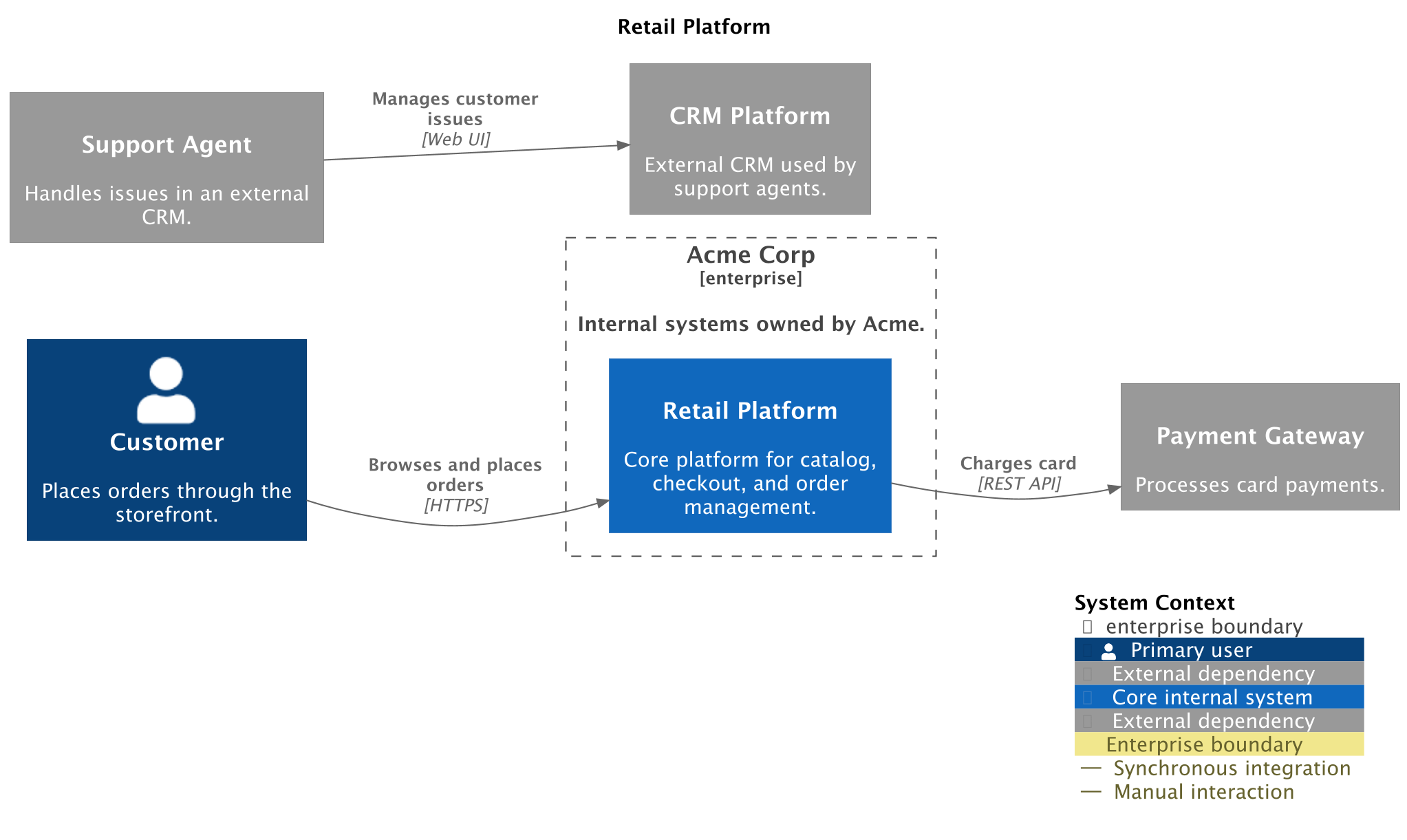
The generated PlantUML example adds tags, links, layout hints, and a legend.
Those features are owned by the PlantUML rendering backend and use
plantuml={...} data or helpers from c4.contrib.plantuml.
from c4 import (
    EnterpriseBoundary,
    Person,
    PersonExt,
    Rel,
    System,
    SystemContextDiagram,
    SystemExt,
)
from c4.contrib.plantuml import (
    LayD,
    LayR,
)
from c4.renderers import (
    PlantUMLRenderOptionsBuilder,
)


with SystemContextDiagram(title='Retail Platform') as diagram:
    customer = Person('Customer', 'Places orders through the storefront.', plantuml={'tags': ['Primary']}, alias='customer')

    support_agent = PersonExt('Support Agent', 'Handles issues in an external CRM.', plantuml={'tags': ['External']}, alias='support_agent')

    payment_gateway = SystemExt('Payment Gateway', 'Processes card payments.', plantuml={'tags': ['External']}, alias='payment_gateway')

    crm_platform = SystemExt('CRM Platform', 'External CRM used by support agents.', plantuml={'tags': ['External']}, alias='crm_platform')

    with EnterpriseBoundary('Acme Corp', 'Internal systems owned by Acme.', plantuml={'tags': ['Enterprise']}, alias='acme_enterprise'):
        retail_platform = System('Retail Platform', 'Core platform for catalog, checkout, and order management.', plantuml={'link': 'https://retail.example.com', 'tags': ['Core']}, alias='retail_platform')

    customer >> Rel('Browses and places orders', technology='HTTPS', plantuml={'tags': ['Synchronous']}) >> retail_platform
    retail_platform >> Rel('Charges card', technology='REST API', plantuml={'tags': ['Synchronous']}) >> payment_gateway
    support_agent >> Rel('Manages customer issues', technology='Web UI', plantuml={'tags': ['Manual']}) >> crm_platform
    LayR(customer, retail_platform)

    LayR(retail_platform, payment_gateway)

    LayD(support_agent, crm_platform)


plantuml_render_options = (
    PlantUMLRenderOptionsBuilder()
    .layout_left_right(
        with_legend=True,
    )
    .show_legend(
        hide_stereotype=False,
        details='Normal',
    )
    .update_legend_title(
        'System Context',
    )
    .add_person_tag(
        tag_stereo='Primary',
        shadowing=False,
        sprite='person',
        legend_text='Primary user',
    )
    .add_external_person_tag(
        tag_stereo='External',
        shadowing=False,
        sprite='person',
        legend_text='External person',
    )
    .add_system_tag(
        tag_stereo='Core',
        shadowing=False,
        sprite='server',
        legend_text='Core internal system',
    )
    .add_external_system_tag(
        tag_stereo='External',
        shadowing=False,
        sprite='cloud',
        legend_text='External dependency',
    )
    .add_boundary_tag(
        tag_stereo='Enterprise',
        shadowing=False,
        legend_text='Enterprise boundary',
    )
    .add_rel_tag(
        tag_stereo='Synchronous',
        legend_text='Synchronous integration',
    )
    .add_rel_tag(
        tag_stereo='Manual',
        legend_text='Manual interaction',
    )
    .build()
)

diagram.set_render_options(
    plantuml=plantuml_render_options,
)
Renderer Behavior
PlantUML supports the richest system-context output, including external element rendering, tags, sprites, links, relationship styling, legends, and layout hints. Mermaid can render the portable model and Mermaid-specific styling, but Mermaid C4 syntax is experimental and does not support PlantUML layout helpers or PlantUML dynamic index helpers.
Generated Source and Image
Generated PlantUML source
@startuml
' convert it with additional command line argument -DRELATIVE_INCLUDE="relative/absolute" to use locally
!if %variable_exists("RELATIVE_INCLUDE")
    !include %get_variable_value("RELATIVE_INCLUDE")/C4_Context.puml
!else
    !include https://raw.githubusercontent.com/plantuml-stdlib/C4-PlantUML/master/C4_Context.puml
!endif

AddPersonTag("Primary", $shadowing="false", $sprite="person", $legendText="Primary user")
AddExternalPersonTag("External", $shadowing="false", $sprite="person", $legendText="External person")
AddSystemTag("Core", $shadowing="false", $sprite="server", $legendText="Core internal system")
AddExternalSystemTag("External", $shadowing="false", $sprite="cloud", $legendText="External dependency")
AddBoundaryTag("Enterprise", $shadowing="false", $legendText="Enterprise boundary")
AddRelTag("Synchronous", $legendText="Synchronous integration")
AddRelTag("Manual", $legendText="Manual interaction")

LAYOUT_LEFT_RIGHT()
LAYOUT_WITH_LEGEND()
UpdateLegendTitle("System Context")

title Retail Platform

Person(customer, "Customer", "Places orders through the storefront.", $tags="Primary")

Person_Ext(support_agent, "Support Agent", "Handles issues in an external CRM.", $tags="External")

System_Ext(payment_gateway, "Payment Gateway", "Processes card payments.", $tags="External")

System_Ext(crm_platform, "CRM Platform", "External CRM used by support agents.", $tags="External")

Enterprise_Boundary(acme_enterprise, "Acme Corp", $tags="Enterprise", $descr="Internal systems owned by Acme.") {
    System(retail_platform, "Retail Platform", "Core platform for catalog, checkout, and order management.", $tags="Core", $link="https://retail.example.com")
}

Rel(customer, retail_platform, "Browses and places orders", "HTTPS", $tags="Synchronous")
Rel(retail_platform, payment_gateway, "Charges card", "REST API", $tags="Synchronous")
Rel(support_agent, crm_platform, "Manages customer issues", "Web UI", $tags="Manual")
Lay_R(customer, retail_platform)
Lay_R(retail_platform, payment_gateway)
Lay_D(support_agent, crm_platform)

SHOW_LEGEND($hideStereotype="false", $details=Normal())

@enduml